Disclosure: WhatConverts didn't pay for this review. The free-trial buttons on this page use my WhatConverts partner (affiliate) link, so I may earn a commission if you sign up through it; that commission is the only money I get from WhatConverts. The score, likes and dislikes come from the client accounts I run, and the prices and rules are checked against WhatConverts' and CallRail's own pages. Some of my clients use WhatConverts, and others use LocaleCRM, a CRM I built for local businesses. So I have a stake in one alternative, and I say so wherever it comes up.
Key takeaways
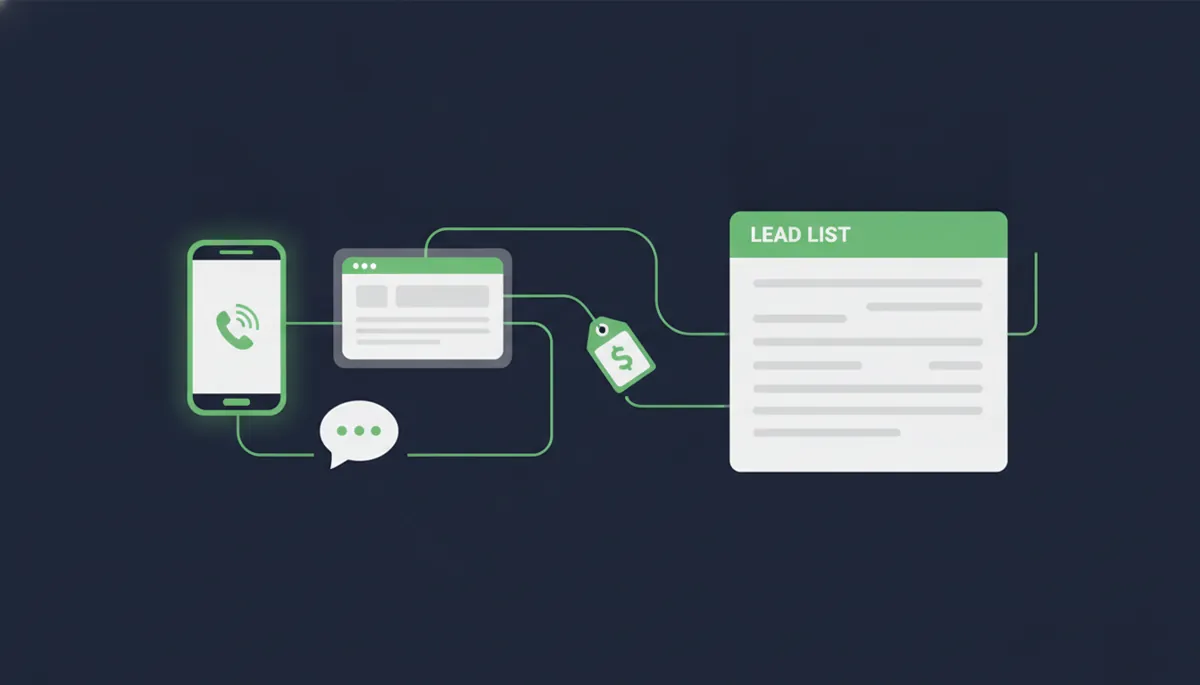
- WhatConverts puts calls, forms and chats in one lead list, with the campaign and keyword next to each lead.
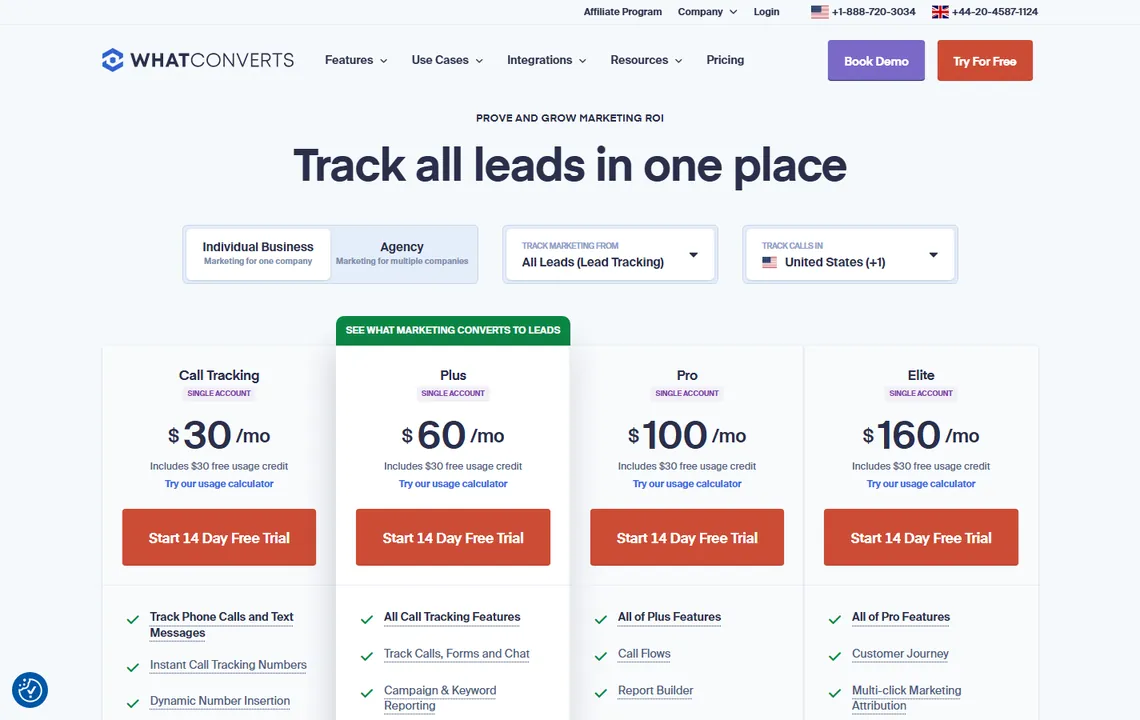
- Pricing starts at $30/month for calls and texts, and the pricing page's feature table lists the Google Ads integration on every plan. Forms and chat start at Plus, $60/month. Each plan includes a $30 usage credit for numbers, minutes and leads.
- Its best feature for Google Ads: mark a lead as quotable, add a quote or sales value, and WhatConverts can send that lead and its value to Google Ads as a conversion.
- The catch: values only flow if someone keeps marking leads. In my accounts, that's where it breaks down.
- For calls plus forms, WhatConverts' published prices are well below CallRail's ($60 vs $105 a month, or $95 with CallRail's yearly billing). For calls only it's $30 vs $55 ($50 billed yearly). Use the calculator below to check yours.
Verdict: a solid way for a local business to see which ads bring real calls and form leads, and to feed job values back to Google Ads. Pick it if someone on your side will mark leads each week. Skip it if nobody will, and Google's own free call tracking may be enough.
Start a 14-day WhatConverts free trial →Affiliate link: I may earn a commission if you sign up. Prices are the ones on WhatConverts’ pricing page.
What WhatConverts is, and who it's built for
WhatConverts tracks the ways people contact a business: phone calls, text messages, web forms, chats and more. Its tracking script swaps the phone number on your site for a tracking number, using a pool of numbers so each visitor session gets its own (WhatConverts calls this dynamic number pools). The same script picks up forms and chats automatically. Every lead lands in one Lead Manager with its source, campaign and keyword (Performance Max and Smart campaigns don't pass keyword data).
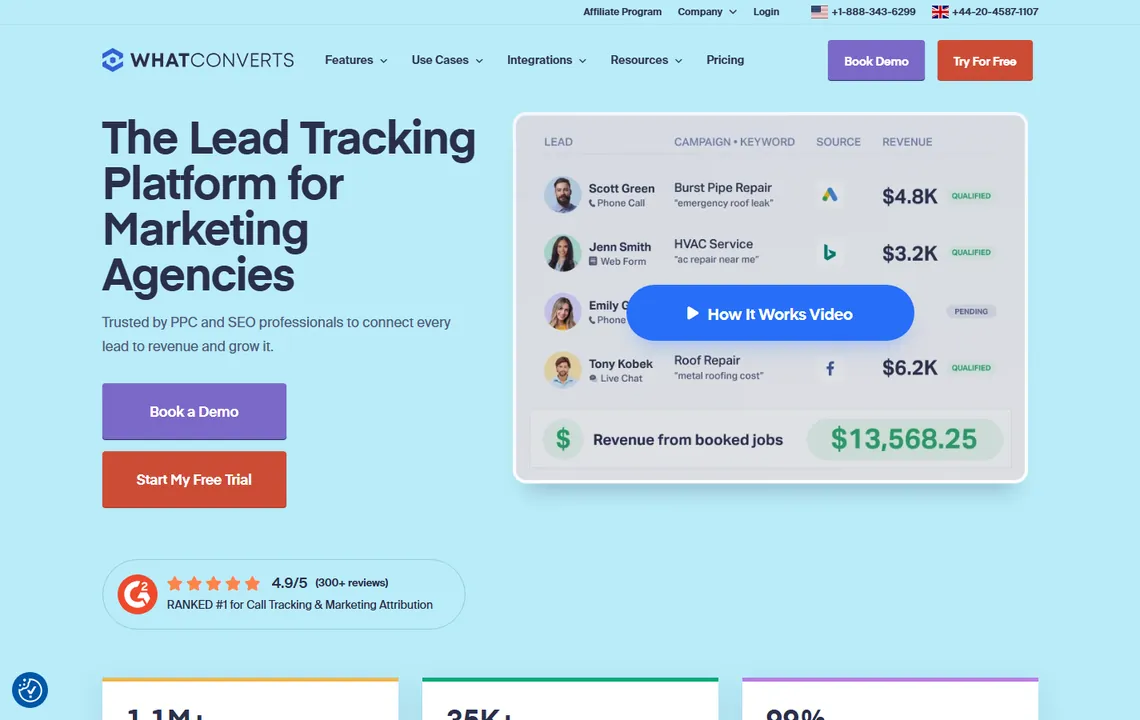
The homepage pitches it to marketing agencies, and the agency plans manage many client accounts. Local businesses can buy the single-account plans directly, with unlimited users on every plan. If you'd rather start with something free, Google Ads has its own call tracking; my Google Ads call tracking guide explains what it covers and where a tool like WhatConverts adds to it.
How I used WhatConverts
I've set up and run WhatConverts in client accounts for local businesses, including cleaning, limo, plumbing and dental. I keep clients anonymous here. Across those accounts I used every part that matters for Google Ads:
- Call tracking with tracking numbers on the website
- Form tracking
- Call recordings, to hear what callers actually asked for
- Quote and sales values on leads
- Sending leads to Google Ads as conversions, with values
- Client reports, so owners could see leads by source

Today some of my clients run on WhatConverts, and others use LocaleCRM, which I built (see the disclosure above). Both approaches can work. What matters is that calls and forms are tracked and that real jobs get back to Google Ads.
WhatConverts pricing (2026)
These are the single-business plans on the WhatConverts pricing page, read 19 Nov 2026. Each higher plan includes everything in the one below.
| Plan | Price | What it adds |
|---|---|---|
| Call Tracking | $30/mo |
|
| PlusForms + chat start here | $60/mo |
|
| Pro | $100/mo |
|
| Elite | $160/mo |
|
Source: WhatConverts pricing page (plan cards and the feature comparison table), read 19 Nov 2026. The Plus plan card lists "Bing, Google Ads & Analytics Integration", but the feature table on the same page and WhatConverts' Google Ads integration help ("Available on: All Plans") list it on every plan. Agency plans with unlimited accounts cost $500, $800 and $1,250 a month.
How the usage credit works
The plan price isn't the whole bill. Each single-business plan includes a $30 usage credit that, in WhatConverts' words, "covers minutes, phone numbers, and other usage-based costs". Above the credit you pay usage rates. The billing help adds that "Unused usage does not roll over into the next month."
- Local tracking number: $2.50 a month each; local minutes: 4.5¢ each
- Toll-free number: $3.50 each; toll-free minutes: 6.5¢ each
- Call transcription: 2¢ per minute; text messages: 3¢ each
- Forms, chats and transactions: 10¢ each (Plus and above)
Two details from the billing FAQ that affect a phone-heavy business: call minutes are "rounded up to the nearest full minute", and "Busy and no-answer calls that connect to the tracking number still count toward usage." There's a 14-day free trial on every plan. I found no contract term on the pricing or help pages, and you can change or cancel the plan yourself. Before cancelling, note that WhatConverts says cancelling deletes the account's data (support can restore it if you ask within 30 days), while downgrading keeps your history but disables the tracking numbers.
Start a 14-day WhatConverts free trial →Affiliate link: I may earn a commission if you sign up. Prices are the ones on WhatConverts’ pricing page.
Estimate your monthly bill: WhatConverts vs CallRail
Enter your typical month. The calculator applies each company's published plan prices and usage rates. It's an estimate: it leaves out taxes, mobile-forwarding surcharges and optional AI extras.
WhatConverts
$60/moCallRail (monthly billing)
$105/moHow it works: WhatConverts = Plus ($60) if you track forms, otherwise Call Tracking ($30; the Google Ads integration is listed on every plan), plus usage above the $30 credit (local numbers $2.50, minutes 4.5¢ each, transcription 2¢/min, forms 10¢). CallRail = Lead Tracking ($55, or $50 billed yearly) without forms, otherwise Lead Tracking Complete ($105, or $95 billed yearly), with 5 local numbers, 250 minutes (transcription included) and, on Complete, 1,000 forms included; extra numbers $3, minutes 6¢, forms 2¢. Both companies round each call up to the next full minute; the calculator rounds your average call length up, so treat the result as an estimate. Prices from both pricing pages, read 19 Nov 2026.
With the defaults (4 numbers, 60 three-minute calls, 30 form leads and transcription), WhatConverts comes to $60 a month and CallRail to $105 with monthly billing ($95 billed yearly). For a business that tracks calls and forms, WhatConverts is usually cheaper. For calls only it's $30 against CallRail's $55 Lead Tracking plan ($50 billed yearly); both companies' feature tables list their Google Ads integration on every plan. CallRail's plans include more numbers, minutes and forms, so the gap narrows for very busy phones, and sites with several hundred form leads a month can come out cheaper on CallRail Complete.
Sending leads and job values to Google Ads
For me, this is one of the two most useful parts. In my view, Google Ads bids better when it knows which clicks turned into real jobs. Here's how WhatConverts does it, per its Google Ads integration help:
- It captures the click ID. With Google Ads auto-tagging on, each ad click carries a GCLID. WhatConverts stores it with any lead that visitor creates.
- You choose what to send. Triggers include "New Lead Received", "Quote Value Received or Added", "Sales Value Received or Added" and "Set as Quotable Lead". Lead Intelligence rules are on the Elite plan.
- Values go with it. WhatConverts can "Send sales values or quote values along with conversions", so Google sees what each lead was worth.
- Marking a value marks the lead. "When a Quote or Sales Value is added to a lead, it is automatically marked as Quotable."
One option is to send only quotable leads, with values, as the main conversion. As long as leads are marked correctly, spam calls, job seekers and wrong numbers aren't sent as conversions, so Google Ads learns from real customers. That's the same idea as the "won jobs, not form fills" approach in my cost per lead guide.
A few rules from WhatConverts' help pages to know before you switch it on:
- Conversions sit as "Pending" first, because "Google requires a 6-hour wait".
- A lead without a GCLID, or one outside your conversion window, isn't sent. WhatConverts notes that Google Ads defaults to a 30-day window and suggests considering "up to 90 days" for leads that take longer.
- WhatConverts creates a conversion action called "Leads (your profile id)". Its help page says not to rename it in Google Ads (unless you use Lead Intelligence); its notes disagree on what happens if you do, so leave the name alone.
- If leads reach Google Ads both through the WhatConverts integration and through Google Analytics events imported as conversions, "the same conversion will be counted twice in Google Ads". Use one route.
- The integration is listed on every plan, including the $30 Call Tracking plan (help page: "Available on: All Plans"; same in the pricing page's feature table). The Plus plan card is the only place that lists it under Plus. Sending different lead types to different conversion actions needs Lead Intelligence, which is on Elite.
New to this? How many clicks before your first lead explains why smart bidding needs a steady flow of real conversions, and the booking software tracking study covers tools that don't send bookings to Google Ads at all.
Try sending lead values to Google Ads: 14-day free trial →Affiliate link: I may earn a commission if you sign up. Prices are the ones on WhatConverts’ pricing page.
What I liked, and what annoyed me
What worked well
- One lead list for everything. Calls, forms and chats sit together, each with its source, campaign and keyword. I can see which keywords bring calls and form leads, not just clicks.
- Quote and sales values to Google Ads. Marking leads quotable and adding job values, then sending them to Google Ads as conversions, is one of the two things I like most about it.
What annoyed me
- Clients stop marking leads. Values only reach Google Ads if someone marks leads as quotable and adds amounts. Busy owners often stop doing it, and then the value data dries up.
- Moving between client accounts is clunky. With many businesses, switching between accounts is clunky, and reports usually need tweaking before I send them to a client.
WhatConverts vs CallRail
CallRail is the most-reviewed alternative to WhatConverts on G2 (1,978 reviews against 324). Both track calls and forms and send conversions to Google Ads. The main differences for a local business are price and what's included.
| WhatConverts | CallRail | |
|---|---|---|
| Calls only | $30/moCall Tracking plan, $30 usage credit | $55/mo$50/mo billed yearly. Lead Tracking; 5 local numbers and 250 minutes included |
| Calls + forms | $60/moPlus plan | $105/mo$95/mo billed yearly. Lead Tracking Complete; 1,000 forms included |
| Extra local number | $2.50 | $3 |
| Extra local minute | 4.5¢+2¢ for transcription | 6¢the 250 included minutes include transcription |
| Values to Google Ads | Quote and sales valuescan send quotable leads only | Call valuesoptional toggle; values sent once |
| Free trial | 14 days | 14 daysno card needed |
| G2 rating | 4.9/5324 reviews | 4.5/51,978 reviews |
Sources: WhatConverts and CallRail pricing pages, CallRail's help article on sending call values to Google Ads, and G2 review pages, all read 19 Nov 2026. CallRail prices are its monthly-billing prices; its pricing page opens on yearly billing, which shows $50 and $95 a month ("Save up to 10%"). WhatConverts lists monthly prices only.
CallRail may suit you better if you need more included numbers and minutes, or if you get several hundred form leads a month (its Complete plan includes 1,000 forms, while WhatConverts charges 10¢ each). For a single local business tracking calls and forms at typical volumes, WhatConverts usually costs less, as the calculator shows.
What other users say
WhatConverts rates 4.9/5 on G2 (324 reviews) and 4.9 on Capterra (50 reviews), read 19 Nov 2026. Three recent G2 reviews, two positive and one with a critical point:
Simple Setup, Great Results, and Helpful Team at a Better Price
it is easy and intuitive, plus the support is exceptional.
It's difficult to reach live support. Most of the time, I just see an “offline chat” status.
Not sure your calls and forms are tracked right? See If We're a Fit — free Google Ads audit →
Who should use WhatConverts (and who should skip it)
Good fit
- Local service businesses that get most leads by phone and want to know which ads and keywords drive calls
- Businesses running Google Ads that will mark leads and add job values each week
- Agencies and freelancers managing several local clients (agency plans include unlimited accounts)
- Clinics that need a HIPAA option. WhatConverts notes that you also need to sign a Business Associate Agreement
Skip it if
- Nobody will mark leads. Without values, you mostly get call tracking, and Google's free call tracking may cover that (see the call tracking guide)
- You get very few calls and forms. If you're still testing whether ads work, start with a realistic budget first
- You want a CRM to run the whole job pipeline. WhatConverts tracks leads; it isn't a job-management CRM
Alternatives
- CallRail: the closest alternative, with more included numbers and minutes and higher plan prices (see the table above)
- Google's own call tracking: free, inside Google Ads, and covers calls from your ads and from your website after an ad click, but not calls from your other channels (see the call tracking guide)
- LocaleCRM: the CRM I built for local businesses, which some of my clients use instead. I'm biased, so judge it on its own site
Setup tips for local businesses
Practical steps, based on WhatConverts' help pages:
- Turn on Google Ads auto-tagging before you install anything. Without the GCLID, leads can't be sent back.
- Use enough tracking numbers in the pool for your traffic, so visitors don't share a number. WhatConverts assigns one per session and recycles it afterwards.
- Test a call and a form from an ad click before you trust the numbers.
- Send leads to Google Ads by one route only: the WhatConverts integration or Google Analytics imports, not both. Also check that Google's own call conversions aren't counting the same calls as primary conversions.
- Mark leads regularly, for example once a week: set quotable leads and add the job value. Without it, no values reach Google Ads.
- Keep the call-recording notice in place where your state or country requires one. Check the rules where you operate.
For trade-specific setup, see my guides for plumbers, cleaning companies, limo services and dentists.
Start your 14-day WhatConverts free trial →Affiliate link: I may earn a commission if you sign up. Prices are the ones on WhatConverts’ pricing page.
WhatConverts review: frequently asked questions
The single-business plans cost $30 (Call Tracking), $60 (Plus), $100 (Pro) and $160 (Elite) a month. Each includes a $30 monthly usage credit for phone numbers, minutes and leads. Usage above the credit is billed at published rates, for example $2.50 per local number and 4.5 cents per local minute. Agency plans cost $500 to $1,250 a month.
In my experience, yes, if someone will mark leads. It tracks calls, forms and chats in one list and can send quote and sales values to Google Ads, for $30 to $60 a month plus usage. If nobody marks leads, you mostly get call tracking, and Google's free call tracking may be enough.
Yes. It captures the Google click ID (GCLID) and sends leads to Google Ads as conversions based on triggers you choose, such as new leads, quotable leads or leads with a quote or sales value. It can send the value too. Auto-tagging must be on. WhatConverts' help page and the pricing page's feature table list the integration on every plan, including the $30 one.
Quotable is a Yes/No field on each lead. You'd typically set it to Yes for real enquiries and No for spam, wrong numbers or job seekers. When you add a quote or sales value to a lead, WhatConverts marks it quotable automatically. You can send only quotable leads to Google Ads so your ads optimize for real customers.
For calls plus forms, WhatConverts usually is: $60 a month against $105 on CallRail with monthly billing, or $95 a month billed yearly. Calls only cost $30 against $55 ($50 billed yearly), and both list their Google Ads integration on every plan. CallRail includes more numbers and minutes, so very busy phone lines narrow the gap. Check your own numbers with the calculator on this page.
Every plan has a 14-day free trial. I found no contract term on the pricing or help pages, and you can change or cancel the plan yourself. Cancelling deletes the account's data (support can restore it if you ask within 30 days), while downgrading keeps your history but disables the tracking numbers.
Yes. Call recording is included from the $30 plan, and transcription costs 2 cents per minute. WhatConverts says transcripts are usually ready within about 5 minutes and that AI lead analysis of calls (summaries, spotted keywords, buyer intent) is included in the 2-cent transcription rate. Its Lead Analysis help page lists the feature under Lead Intelligence on the Elite plan, so check your plan before relying on it.
Only through my affiliate link. WhatConverts didn't pay for this review, but the free-trial buttons on this page use my WhatConverts partner link, so I may earn a commission if you sign up through them. The score, likes and dislikes come from client accounts I run. Some of my clients use WhatConverts and others use LocaleCRM, a CRM I built, so I also have a stake in one alternative.
Sources
- WhatConverts. “Pricing.” https://www.whatconverts.com/pricing/. Accessed 19 Nov 2026.
- WhatConverts Help. “What is the included usage?” https://www.whatconverts.com/help/docs/whatconverts-admin/billing-and-usage/what-is-the-included-usage/. Accessed 19 Nov 2026.
- WhatConverts Help. “Billing FAQs.” https://www.whatconverts.com/help/docs/troubleshooting-and-faqs/faqs/billing-faqs/. Accessed 19 Nov 2026.
- WhatConverts Help. “Cancel or downgrade your account (individual business plans).” https://www.whatconverts.com/help/docs/whatconverts-admin/account-settings-and-management/cancel-or-downgrade-your-account-individual-business-plans/. Accessed 19 Nov 2026.
- WhatConverts Help. “Understand the Google Ads integration.” https://www.whatconverts.com/help/docs/integrations/google-ads-integration/understand-the-google-ads-integration/. Accessed 19 Nov 2026.
- WhatConverts Help. “Google Ads FAQs.” https://www.whatconverts.com/help/docs/troubleshooting-and-faqs/faqs/google-ads-faqs/. Accessed 19 Nov 2026.
- WhatConverts Help. “Troubleshoot conversion mismatches between Google Ads and WhatConverts.” https://www.whatconverts.com/help/docs/troubleshooting-and-faqs/troubleshooting/troubleshoot-conversion-mismatches-between-google-ads-and-whatconverts/. Accessed 19 Nov 2026.
- WhatConverts Help. “What is the Google Ads integration?” https://www.whatconverts.com/help/docs/integrations/google-ads-integration/what-is-the-google-ads-integration/. Accessed 19 Nov 2026.
- WhatConverts Help. “Create conversion actions using the Google Ads integration.” https://www.whatconverts.com/help/docs/integrations/google-ads-integration/create-conversion-actions-using-the-google-ads-integration/. Accessed 19 Nov 2026.
- WhatConverts Help. “Manage sales and quote values in the Lead Manager.” https://www.whatconverts.com/help/docs/using-whatconverts/lead-manager/access-and-manage-lead-data/manage-sales-and-quote-values-in-the-lead-manager/. Accessed 19 Nov 2026.
- WhatConverts Help. “Understand the dynamic number pools.” https://www.whatconverts.com/help/docs/using-whatconverts/lead-tracking/call-tracking/understand-the-dynamic-number-pools/. Accessed 19 Nov 2026.
- WhatConverts Help. “Enable call transcription.” https://www.whatconverts.com/help/docs/using-whatconverts/lead-tracking/call-tracking/enable-call-transcription/. Accessed 19 Nov 2026.
- WhatConverts Help. “Understand the AI usage rates” and “Enable Lead Analysis.” https://www.whatconverts.com/help/docs/whatconverts-admin/billing-and-usage/understand-the-ai-usage-rates/ and https://www.whatconverts.com/help/docs/using-whatconverts/lead-manager/lead-details/enable-lead-analysis/. Accessed 19 Nov 2026.
- WhatConverts Help. “Data privacy and security FAQs” (HIPAA). https://www.whatconverts.com/help/docs/troubleshooting-and-faqs/faqs/data-privacy-and-security-faqs/. Accessed 19 Nov 2026.
- CallRail. “Pricing.” https://www.callrail.com/pricing. Accessed 19 Nov 2026.
- CallRail Support. “Sending call values to Google Ads.” https://support.callrail.com/hc/en-us/articles/5711796699277. Accessed 19 Nov 2026.
- G2. “WhatConverts reviews” and “CallRail reviews.” https://www.g2.com/products/whatconverts/reviews. Accessed 19 Nov 2026.
- Capterra. “WhatConverts reviews.” https://www.capterra.com/p/152001/WhatConverts/reviews/. Accessed 19 Nov 2026.
Pricing and features change. Check the WhatConverts and CallRail pricing pages before you buy. Opinions and the score are mine, based on client accounts I've run.
Disclaimer: This page is general information about Google Ads, not legal, tax, medical or financial advice, and not advice tailored to your business. Prices and ratings are taken from the vendors' and review sites' pages on the dates shown, and Google’s products and policies change, so check the linked sources before relying on them. Statements without a cited source, and views marked “in my experience”, are my professional opinion. Results vary and nothing here guarantees results. PPCfolks is independent and not affiliated with or endorsed by Google, WhatConverts or CallRail. See the terms.